NovoPen 6 and Echo Plus on iPhone: import your insulin doses automatically
Yes: Dulce reads the memory of NovoPen 6 and NovoPen Echo Plus with your iPhone's NFC and adds every dose to your Logbook with its exact time, next to your glucose readings. These pens keep the last 800 doses; Dulce hides priming shots (2 units or less just before a dose), never duplicates doses when you scan again, and doesn't calculate or suggest doses. It's free, and with a Shortcuts automation you just hold the pen to your iPhone.
· 4 min read
Writing down every injection is the part of diabetes care most of us skip. You inject, you get on with your day, and two hours later you can't remember whether you took your long-acting or how many units went in at lunch. A smart insulin pen solves that by remembering for you, and Dulce reads that memory with your iPhone and puts every dose in your Logbook, right next to your glucose. It's free, and it takes a couple of seconds.
What a smart insulin pen records
Novo Nordisk's NovoPen 6 and NovoPen Echo Plus are reusable pens with a dose memory built in. According to Novo Nordisk, they record the time and date of every injection and the number of units, and keep the last 800 doses, which is roughly three months for most people. That includes the small safety shots you do before a dose.
| Pen | Dose range | Steps |
|---|---|---|
| NovoPen 6 | 1 to 60 units | 1 unit |
| NovoPen Echo Plus | 0.5 to 30 units | 0.5 units |
The data stays in the pen until you hold it to a phone: the transfer works over NFC, the same contactless technology as Apple Pay. Novo Nordisk notes that the pens aren't approved in the United States; they're sold in Europe and other countries, usually through your diabetes clinic.
Why it's worth using
- Nothing to type, nothing forgotten. Every dose arrives with the exact time and units the pen recorded. "Did I take my evening insulin?" gets a real answer: look at the Logbook.
- Doses next to your glucose. Each injection sits on the same timeline as your sensor readings, so you can see what happened after a meal and its bolus, or overnight after your long-acting.
- Priming shots kept apart. The small shot before each dose isn't counted as insulin you took (more on that below).
- Better appointments. Dulce's doctor report includes your logged insulin per day, so your care team sees doses and glucose together instead of a half-remembered notebook.
- Free. Reading a pen doesn't need Dulce Pro.
How to read your pen in Dulce
Open the insulin entry
Tap + to add an entry and choose Insulin, then tap Scan insulin pen. You can also do it from Settings → Insulin pens.
Hold the pen to the top of your iPhone
Hold the top of your iPhone against the pen's label and keep both still for a couple of seconds, until Dulce says it's done. The NFC reader is at the top edge of the iPhone.
Tell Dulce what's in the pen (first time only)
A pen doesn't know which insulin is in it, so the first time Dulce asks What's in this pen?: Fast-acting or Long-acting. You can change it later in Settings → Insulin pens.
Check your Logbook
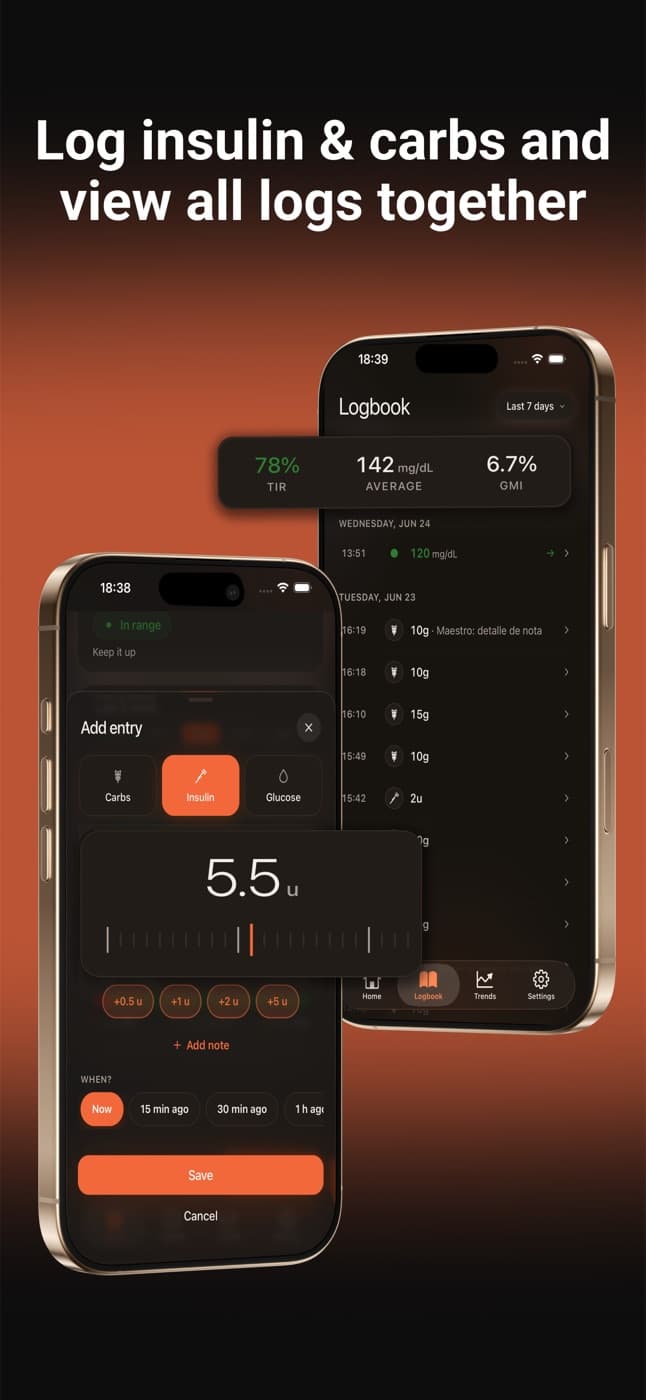
The doses appear in the Logbook marked From pen, and on today's chart. Scan again whenever you like: only new doses are added, never duplicates.
One-touch scan: hold the pen and Dulce opens
An iPhone can't open an app just because you hold an NFC tag to it, but Apple's Shortcuts app can, with an automation. Dulce walks you through it in Settings → Insulin pens → Set up one-touch scan: you copy Dulce's pen link, create an NFC automation in Shortcuts, scan your pen once, set it to run immediately and paste the link. It takes about two minutes, once per pen.
After that, you just hold the pen to the top of your iPhone: Dulce opens by itself and adds the new doses. No tapping.
Priming shots and split doses
Before each injection you do a small safety shot to check the needle works. The pen remembers it like any other dose. Dulce treats small shots (2 units or less) just before a dose as priming and hides them, so your totals aren't inflated. If you want to see them, turn on Show priming shots in Settings → Insulin pens. Shots taken within a minute of each other are combined into one dose.
Things to know
- Which pens: NovoPen 6 and NovoPen Echo Plus. Other connected pens and pen caps aren't supported yet.
- Which iPhone: any iPhone that runs Dulce has the NFC reader it needs.
- Disposable pens (the prefilled ones you throw away) have no memory, so there's nothing to read. You can still log those doses by hand in a couple of taps: see the Logbook guide.
- Long-acting and fast-acting stay separate in the Logbook, and the Trends tab puts your glucose patterns right next to them.
Sources
- Novo Nordisk. NovoPen 6. novonordisk.com
- Novo Nordisk. NovoPen 6 and NovoPen Echo Plus: connectable apps. novonordisk.com
- Novo Nordisk. NovoPen 6 and NovoPen Echo Plus quick guide. novonordisk.com
Quick questions
Which pens can Dulce read?
Novo Nordisk's NovoPen 6 and NovoPen Echo Plus, over NFC. Other connected pens and pen caps aren't supported yet.
Do I need Dulce Pro to read my pen?
No. Reading an insulin pen is free, like the Logbook. Read more: Diabetes logbook: log carbs and insulin next to your Libre
Are doses duplicated if I scan twice?
No. Every dose has its time in the pen, so scanning again only adds the new ones.
Does Dulce tell me how much insulin to take?
No. Dulce only records what your pen recorded. It doesn't calculate or suggest doses; that's for you and your care team.
This article is for information and does not replace advice from your care team. Dulce is not a medical device and does not replace your sensor's alarms.
Dulce is an independent app, not affiliated with Abbott. FreeStyle Libre, LibreLink and LibreLinkUp are trademarks of Abbott.
Lives with diabetes, writes the Dulce guides
Levan is Giorgi's brother and also lives with diabetes. He writes the Dulce guides from the point of view of someone who manages diabetes every day.