How to see your child's glucose on your iPhone
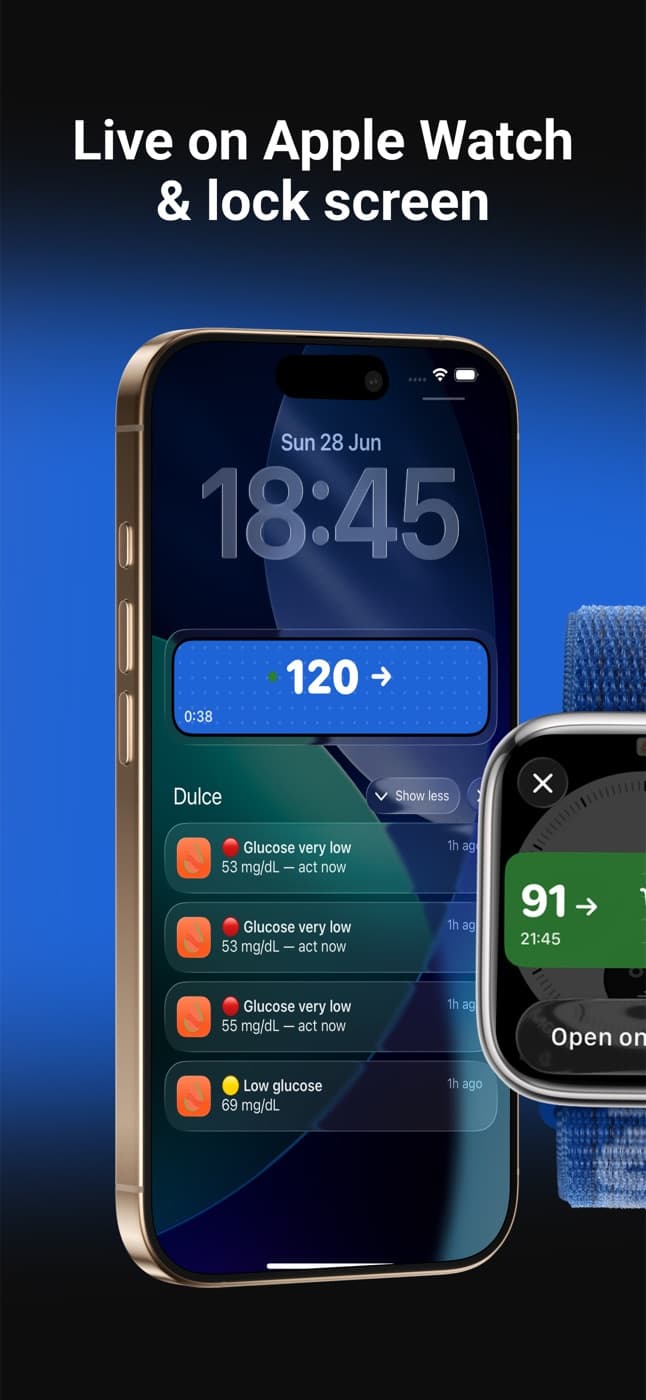
You can see your child's FreeStyle Libre glucose on your own iPhone, Lock Screen included, with low and high alerts and without unlocking your phone. Either your child invites you as a follower from Dulce, or you sign in to Dulce with the LibreLinkUp account they already share with. Their phone has to keep the Libre app reading the sensor and stay online, because that is how readings leave the sensor.
· 4 min read
If your child, partner or one of your parents wears a FreeStyle Libre, you probably check on them more than you'd like to admit: a message at break time, a call when they don't answer, a look at the phone in the middle of the night. Seeing their glucose on your own iPhone, without asking, takes a lot of that weight off. This guide is for the person who follows, not the one who wears the sensor: what you need, the two ways to set it up, and how to keep it useful rather than stressful.
What you need
- A FreeStyle Libre 2 or Libre 3 on the person you care for, read by the Libre app on a phone (FreeStyle LibreLink or FreeStyle Libre 3). That phone has to stay with them and have internet, because that's how readings leave the sensor.
- An iPhone for you. Dulce is an iPhone and Apple Watch app.
- Sharing turned on in LibreLinkUp, Abbott's follower service. It's how readings reach any app other than the one that reads the sensor. The LibreLink vs LibreLinkUp guide shows the four steps.
Two ways to follow someone with Dulce
Which one fits depends on whose phone Dulce runs on.
Option 1: they use Dulce and invite you
Best for teenagers and adults who have their own iPhone and want to stay in control of their data.
They set up Dulce
On their iPhone they install Dulce and sign in with the LibreLinkUp account that receives their readings.
They invite you
In Settings → Followers they tap Invite someone and send you the link or the code. The invite expires after 24 hours.
You accept
You install Dulce, which is free for followers, and open the link. With a code, tap "Following someone?" on Dulce's first screen and type it in.
Sharing is a Dulce Pro feature for the person wearing the sensor, with a 14-day free trial. They can invite up to 3 people, remove anyone at any time, and you see their glucose from the moment you join. You don't need a sensor or an Abbott account.
Option 2: you open Dulce with your own LibreLinkUp account
Best for younger children, or for an older parent who doesn't want another app on their phone.
If the Libre app on their phone already shares with your LibreLinkUp account, you can sign in to Dulce on your iPhone with that account. Dulce then shows the glucose shared with you, and nothing changes on their side. Dulce shows one person per LibreLinkUp account.
From there you can invite the other parent or the grandparents as followers yourself, as in option 1.
What you see on your iPhone
- Their glucose, the trend arrow and the chart, with the time of the last reading so you know at a glance whether it's fresh.
- Your own alerts when they go low or high. As a follower you set your own quiet hours, and very low readings always come through.
- Their glucose on your Lock Screen with a Live Activity, so you don't need to open anything. How it works is in the Lock Screen guide.
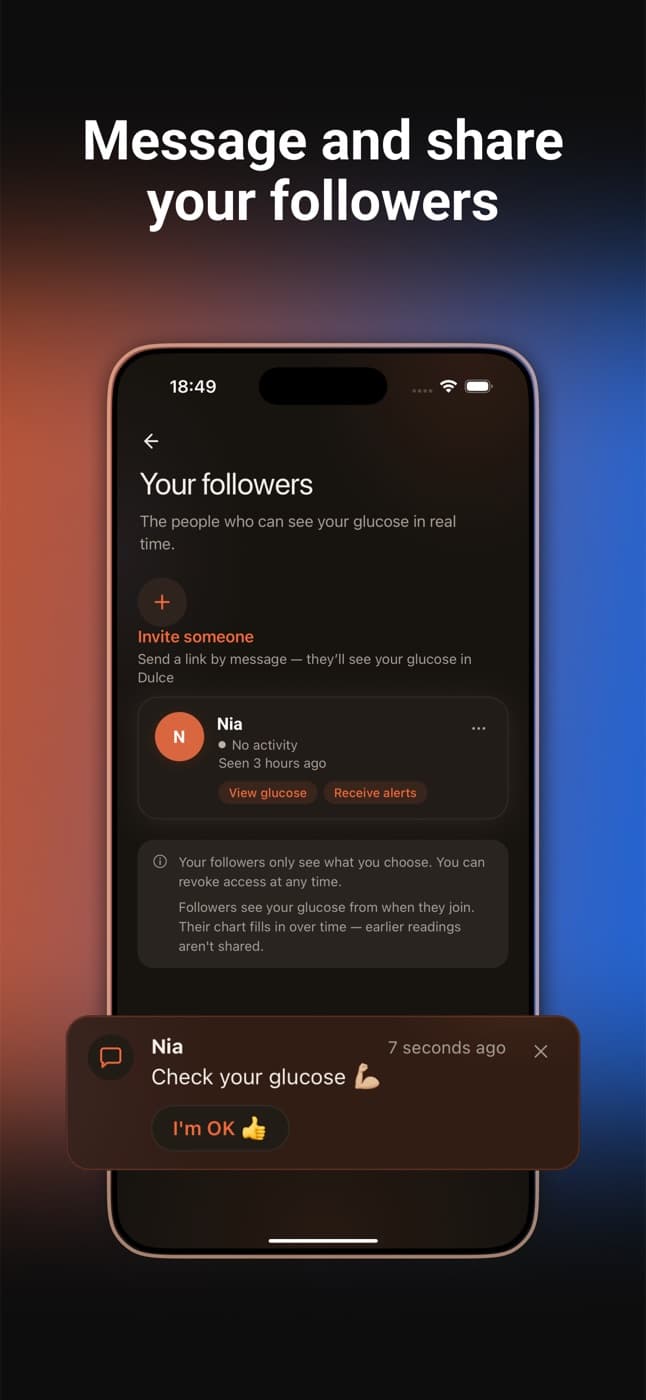
- Short messages. As a follower you can send "Are you OK?", "Check your glucose" or your own text. It arrives as a notification and they reply "I'm OK" with one tap, without opening the app. They can turn family messages off in Settings.
At night
Nights are when following helps most. A few things make a difference:
- Keep your iPhone off silent at night, and if you use the Sleep Focus, allow Dulce in it (Settings → Focus). Dulce's alerts follow your iPhone's sound settings.
- Charge your iPhone on its side to use StandBy and keep the number next to the clock, as explained in the widgets guide.
Keep it calm
Following someone works best when you agree on it together. Some ideas that help:
- Agree who answers an alert. If two parents and a grandparent all react to the same low, the person with diabetes gets three calls instead of help.
- Give it a moment. A low alert doesn't always need a message. The trend arrow and the next reading often tell you whether they're already treating it.
- Respect privacy with teenagers. Option 1 lets them decide who follows and switch messages off. That trust is worth more than one extra reading.
If you see no readings
Almost always the sensor phone isn't uploading: no internet, the Libre app closed by the system, or sharing switched off. The LibreLinkUp troubleshooting guide covers every cause. For more on what the person you follow controls, see how to share your Libre glucose with your family.
Quick questions
Can I monitor my child's glucose on my iPhone Lock Screen?
Yes. With Dulce, your child's FreeStyle Libre glucose shows on your Lock Screen as a Live Activity, with low and high alerts, without unlocking your phone. Your child invites you as a follower from Dulce, or you sign in to Dulce with the LibreLinkUp account they already share with.
Does my child need an iPhone?
They need a phone with the Libre app reading their sensor and an internet connection. To invite you from Dulce, that phone has to be an iPhone; if it only shares with your LibreLinkUp account, you open Dulce on your iPhone with that account.
How much does it cost to follow someone?
Nothing for the follower. Sharing is a Dulce Pro feature for the person wearing the sensor, with a 14-day free trial, and allows up to 3 followers.
Does it work for caring for an older parent?
Yes. If their Libre app shares with your LibreLinkUp account, you sign in to Dulce with it and they don't have to install anything else on their phone.
This article is for information and does not replace advice from your care team. Dulce is not a medical device and does not replace your sensor's alarms.
Dulce is an independent app, not affiliated with Abbott. FreeStyle Libre, LibreLink and LibreLinkUp are trademarks of Abbott.
Founder of Dulce, lives with type 1 diabetes
Giorgi lives with type 1 diabetes and founded Dulce. He built the app because he was tired of unlocking his phone, opening an app and waiting just to see one number. He writes about what he uses every day with his sensor, iPhone and Apple Watch.